
Fundamental SEO Analysis
The core on-page metrics of any page in one view. Spot where a page is weak and where there is an easy opportunity to improve visibility.
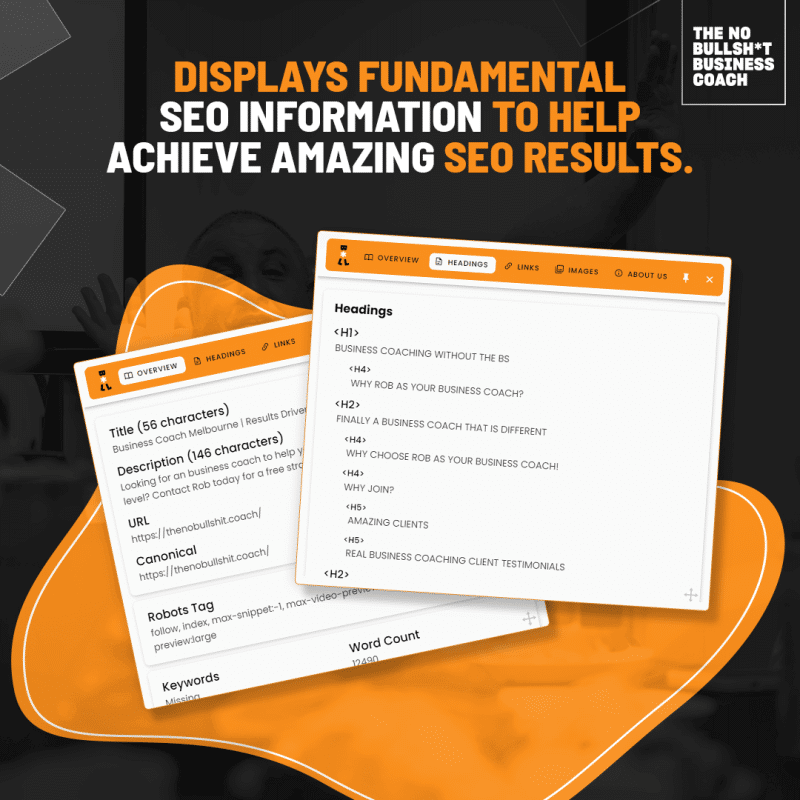
See what a search engine sees on any page — yours or your competitor’s.
Get The Free ExtensionFree, and genuinely free
Every SEO tool on the market has the same problem: it buries three things that matter under four hundred that don’t. You open it, you are hit with dashboards, scores and metrics, and you close it again none the wiser.
So I built the one I actually wanted. The No BS SEO Tool is a free Chrome extension that surfaces the fundamental on-page elements of any page you are looking at — instantly, in one panel, in language a business owner can read.
Open a page, click the icon, and you can see its heading structure, every link on it and the anchor text attached to each one, and which images have ALT text and which are invisible. That is it. No account, no trial, no credit card, no fourteen-day countdown.
It works on your competitors’ pages too, which is where most owners have their first genuinely useful SEO moment. Everything I teach in the digital marketing and SEO strategy pillar starts with being able to see what is actually on a page — and this is how you see it.
Book A Free 30 Min ChatWhat it does
The core on-page metrics of any page in one view. Spot where a page is weak and where there is an easy opportunity to improve visibility.
See exactly what headings a page uses and how they are structured. Multiple H1s and heading levels chosen for the font size become obvious immediately.
Anchor text matters enormously for SEO. Get a near-instant list of the links on a page and the anchor text attached to each one.
ALT text matters, but how do you know which image has what? No more guessing — every image on the page and its ALT text, listed.
Deliberately narrow. It answers the questions you can act on today instead of drowning you in metrics that change nothing.
No account, no subscription and no upsell sitting behind it. Install it, use it, and keep using it.
Who it is for
This is not a tool for agencies to generate client reports with. It is for the business owner who suspects they are being taken for a ride and wants to check something for themselves in under a minute.
It is for the owner briefing a web developer who wants to point at a real problem instead of describing a feeling. It is for anyone comparing their own page against the competitor who keeps outranking them and wondering what the difference actually is.
And it is for owners partway through learning this properly — the ones I work with in business coaching in Melbourne, who want to stop paying thousands a month for something they can largely handle themselves once they understand it.
If you want to know who built it and why I keep giving SEO knowledge away for free, the story is on the about Rob page.
Get started
Under two minutes from never having heard of it to looking at your own website properly for the first time.
Add the extension from the Chrome Web Store at chromewebstore.google.com. It is free and there is nothing to sign up for.
Your own home page is the right place to start. Your most important service page is the right place to go second.
The panel opens with the fundamentals of that page: headings, links and anchor text, images and ALT text.
Open the business currently outranking you and run the same check. The differences are usually not subtle.
Most of what you will spot is quick to correct. If it turns out to be structural rather than cosmetic, that is what the paid audit is for.
What it will show you
Where the tool stops
I will be straight with you, because that is the whole business model. A browser extension shows you what is on a page. It cannot tell you whether your site can be crawled properly, whether your pages target what your customers actually search for, or whether the agency invoicing you every month is earning it.
That is what the SEO website audit is for — a once-off, independent review of the whole site with the findings explained to you face to face and a money-back guarantee behind it.
Use the free extension first. If what you find worries you, contact Rob and we will work out whether a full audit is warranted. If it isn’t, I will tell you that on the call and you can keep your money.
Contact RobYou can’t fix what you can’t see. Start by looking at your own page properly.
Robert Adelman — The No Bullshit Business Coach
Straight answers
Yes. It is free to install and free to use, with no account, no trial period and no paid tier waiting behind it.
I give it away for the same reason I teach SEO basics to the owners I coach: the more you understand, the less anyone can overcharge you for it.
From the Chrome Web Store: the No BS Coach SEO extension listing. Add it to Chrome and you are done.
There is nothing to configure. Open any page, click the icon and the panel does the rest.
No. It was built specifically for business owners who are not SEO specialists and do not want to become one.
The panel shows plain lists — headings, links and anchor text, images and ALT text — rather than scores and jargon you would then have to go and look up.
The fundamentals of whatever page you have open: its heading structure, the links on the page and the anchor text attached to them, and the images along with their ALT text.
It is deliberately focused on the on-page basics that get skipped most often and cost the most when they are wrong.
No, and nothing that claims to should be trusted. It shows you what is on the page so you can decide what needs changing.
The fixing is either done by you, by your web developer, or worked through together as part of business coaching in Melbourne.
The extension inspects one page at a time and reports what is on it. The SEO website audit reviews your entire site — technical foundations, content, structure and the value you are getting from your current agency.
The audit also comes with a face-to-face walkthrough, 30 days of unlimited access to me, and a money-back guarantee. The extension is a torch; the audit is the full inspection.
Yes, and you should. It works on any page you can open in Chrome, so you can run the same check on the business currently outranking you.
Comparing your page against theirs is usually the fastest way to understand why they are winning. Owners say as much in the client reviews — SEO stops feeling mysterious once you can see it.
Let’s chat business
Installed the extension and don’t like what you found? Tell me what you are seeing and I’ll point you at the fix.
Real business coaching client testimonials